Document Processes. Train Teams. Close Deals.

The fastest way to turn any workflow into a step-by-step guide. Build SOPs, onboard new hires, document change management, and create polished tutorials — all by simply clicking through your process. Export to Word, PowerPoint, PDF, or Markdown in seconds. Add your company branding for professional results.

See CLYP in Action

The cleanest UI for screen capture. Designed for speed and built for professionals.
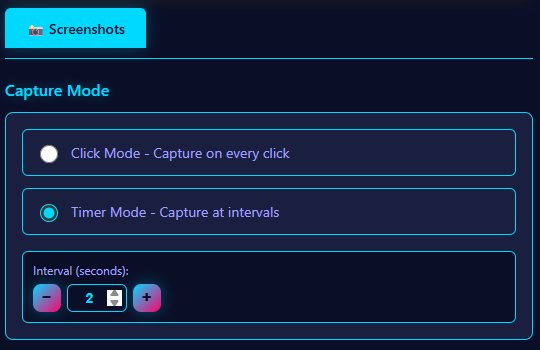
CLYP main popup interface showing capture modes

Choose Your Capture Mode

Click mode for demos, Timer mode for workflows. Switch between capture modes instantly.

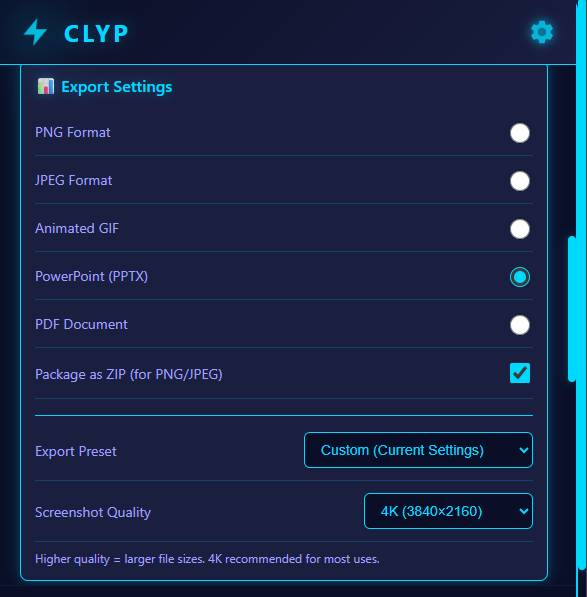
CLYP export settings with format presets

Export to Any Platform

Export to Word for SOPs, PowerPoint for training decks, or Markdown for your wiki. One capture session, every format your team needs.

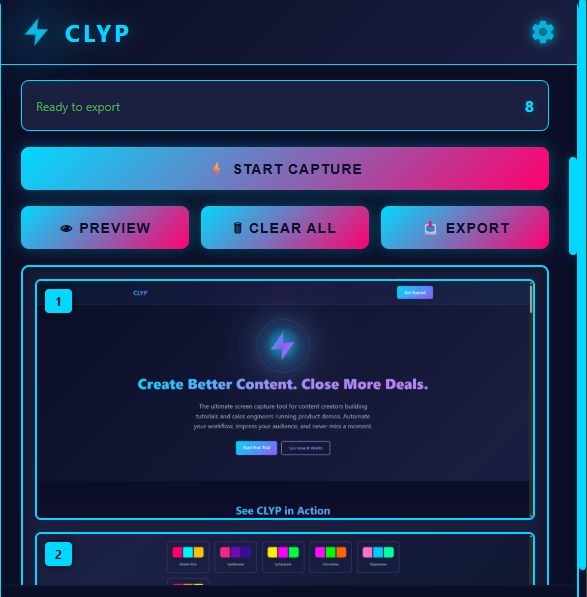
CLYP preview grid showing captured screenshots

Review Before You Share

See all your captures at a glance. Delete unwanted shots with one click. Only export the perfect frames.

Start Creating in Under 2 Minutes

1

Install the Extension

Click "Add to Chrome" above to install CLYP from the Chrome Web Store. The installation takes just a few seconds.

2

Pin to Toolbar

After installation, click the puzzle icon in your Chrome toolbar and pin CLYP for easy access. This ensures you can start capturing with just one click.

3

Start Capturing

Choose click mode for demos and tutorials, or timer mode for automated workflows. Hit record and let CLYP do the work while you focus on your content.

Built For Your Workflow

📋

Ops & Process Teams

Build standard operating procedures that actually get followed. Click through any process once and CLYP writes the SOP for you — like Scribe, but with full export control.

  • Click-capture any process into a step-by-step SOP
  • Export to Word (DOCX) for company wikis & SharePoint
  • Generate Markdown tutorials for Confluence & Notion
  • Standardize training across teams and locations
  • Smooth change management with visual guides
  • Reduce onboarding time and support tickets
🎬

Content Creators

Create professional tutorials, course materials, and social media content in minutes, not hours.

  • Auto-capture every click for step-by-step tutorials
  • Timer mode for workflow demonstrations
  • Export to PowerPoint, Word, or Markdown
  • 4K quality screenshots for crisp content
  • One-click tutorial generation from screenshots
  • Smart sequencing removes duplicates automatically
💼

Sales Engineers

Automate demo documentation and create polished presentations that close deals faster.

  • Document demos automatically with click capture
  • Generate presentation-ready slides instantly
  • Export to PPTX or DOCX for prospect handoffs
  • Create repeatable demo scripts
  • Share polished materials with prospects
  • Smart sequencing cleans up captures before sharing

Powerful Features That Save Hours

📸

Automated Click Capture

Automatically screenshot every click as you demonstrate your product or create your tutorial. No manual clicking required.

👁️

Screenshot Preview

Preview your captures before exporting. Delete individual screenshots and ensure everything looks perfect.

📊

Export to Word & PowerPoint

One click to a polished DOCX for SOPs and wikis, or a PPTX for decks and training. Your process docs land in the format your team already uses.

Timer-Based Capture

Set automatic intervals to capture long-running workflows. Perfect for documenting multi-step processes, migration runbooks, and compliance procedures.

🎨

4K Quality Output

Export in 1080p, 4K, or 8K resolution. Your screenshots look professional on any screen or in any presentation.

Customizable Tone

Set your preferred tone for AI captions - friendly, professional, technical, or any custom style you need.

🔒

Privacy First

All processing happens locally on your machine. Your sensitive client demos and content never leave your computer.

🧠

Smart Screenshot Sequencing

AI removes duplicates, flags blurry frames, and suggests reordering before export — so your SOPs and tutorials are clean the first time, no manual editing required.

📝

Instant SOP & Tutorial Generation

Click through a process once and get a complete step-by-step guide — numbered steps, change descriptions, and callout suggestions — in Markdown, HTML, or Word. Drop it straight into Confluence, Notion, or SharePoint.

Plans That Scale With You

Start free with 500 screenshots. Upgrade when you're ready to document every process your team runs.

Monthly
$9/mo
 
  • Unlimited screenshots
  • Export to DOCX, PPTX, Markdown, PNG, PDF
  • One-click SOP & tutorial generation
  • Branded PDF tutorials with company logo & colors
  • Ctrl+Q hotkey support
  • Email support
Start Monthly
🎨 ADD-ON

Premium Themes Pack

6 exclusive neon 80s themes

+$3/month
Add Theme Pack ($12/mo total)

Premium Themes Included:

Upside Down
Synthwave
Cyberpunk
Retrowave
Vaporwave

Ready to Document Every Process Your Team Runs?

Join ops teams, content creators, and sales engineers who've automated hours of manual documentation. Start your free trial today.

Try CLYP Free